

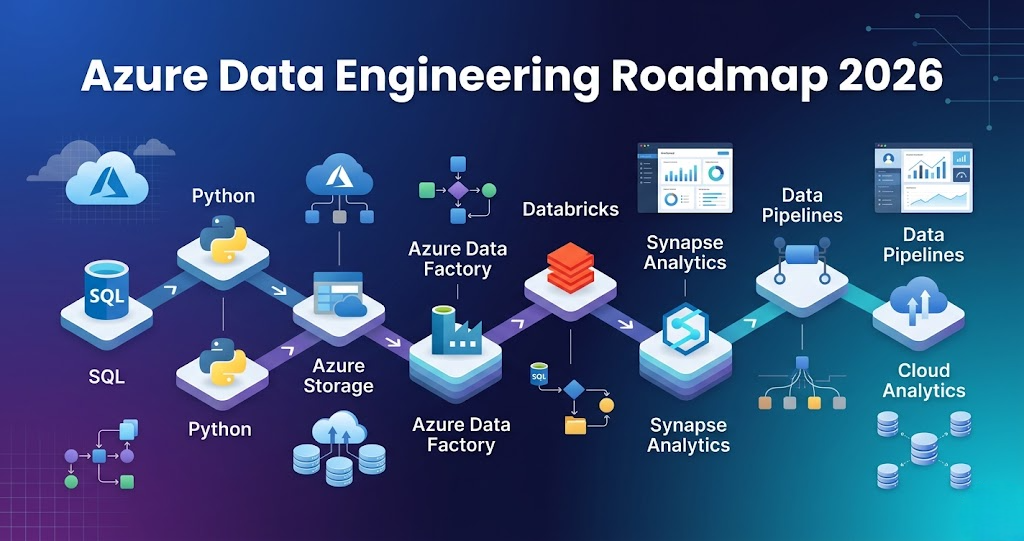
Azure Data Engineering Roadmap 2026 – Step-by-Step Guide for Beginners Introduction Trying to learn Azure Data Engineering but feeling lost? You’re not alone. Most people: But when asked to build a complete data pipeline, they get stuck. Because knowing tools is not equal to knowing how to connect them. In this blog, you’ll get a clear, step-by-step Azure Data Engineering roadmap that shows: What is Azure Data Engineering? Azure Data Engineering is the process of: Using Azure services like: In simple terms: You build data pipelines that move and transform data on Azure. Step 0: Foundation (Before Azure) Before learning Azure tools, you must learn basics. Learn: These are core skills required for any data engineer. Step 1: Data Storage (Azure Data Lake) Every pipeline starts with storage. Azure Data Lake Storage is used to store: Typical structure: Without proper storage design, pipelines become difficult to manage. Step 2: Data Ingestion (How Data Enters) Data comes from multiple sources: Azure Data Factory is used for ingestion. It supports: Azure Data Factory helps move data from source to storage. Step 3: Data Processing (Core Layer) This is where data is transformed. Tools used: Typical work: This is where raw data becomes useful. Step 4: Data Warehousing (Analytics Layer) After processing, data is stored for analytics. Azure Synapse Analytics is used for: Proper table design improves performance. Step 5: Orchestration (Pipeline Automation) Pipelines are not run manually. Tools used: They control: Step 6: Monitoring and Logging Production pipelines must be monitored. Tools: Used for: Step 7: Security and Access Control Security is very important. Used for: Azure uses: Step 8: Core Skills (Must Have) To succeed in Azure Data Engineering: SQL Python Spark These are mandatory skills. Step 9: Data Quality and Testing Data must be validated before use. Includes: Ensures reliable pipelines. Step 10: CI/CD and Deployment Modern pipelines use automation. Flow: Step 11: Execution Layer Data processing runs on: This is where large-scale data is processed. Step 12: End-to-End Azure Data Pipeline Complete flow:
Spark vs Hadoop vs Databricks (Clear Comparison for Beginners 2026)
Introduction Trying to understand Spark vs Hadoop vs Databricks but getting confused? You’re not alone. Most people: But when asked how they are different and where each one is used, they get stuck. Because knowing tools is not equal to understanding how they fit in real data pipelines. In this blog, you’ll understand: Hadoop is used for storage and batch processing, Spark is used for fast data processing, and Databricks is a platform that makes Spark easy to use and manage. What is Hadoop? Hadoop is a big data framework used for storing and processing large datasets. It mainly includes: In simple terms: Hadoop stores and processes data in batches. What is Spark? Apache Spark is a fast data processing engine. It is used for: In simple terms: Spark processes data faster than Hadoop. What is Databricks? Databricks is a cloud platform built on top of Apache Spark. It provides: In simple terms: Databricks makes Spark easier to use. Spark vs Hadoop vs Databricks Difference Hadoop: Spark: Databricks: Spark vs Hadoop vs Databricks Comparison Hadoop: Spark: Databricks: When to Use Hadoop Use Hadoop when: When to Use Spark Use Spark when: When to Use Databricks Use Databricks when: Real-World Example Pipeline: This is how they work together. Why Spark Replaced Hadoop MapReduce So most modern systems use Spark instead of MapReduce. Common Mistakes
Apache Spark Basics for Beginners (Complete Guide 2026)
Introduction Trying to learn Apache Spark but feeling confused where to start? You’re not alone. Most people: But when asked how Spark works in a real data pipeline, they get stuck. Because knowing Spark concepts is not equal to understanding how Spark processes data. In this blog, you’ll understand: What is Apache Spark? Apache Spark is a distributed data processing engine used to process large amounts of data. In simple terms: Spark is used to process big data quickly. Apache Spark processes large data across multiple machines in parallel. How Spark is Used in Data Engineering In real projects, Spark is used for: Spark is the core processing engine in data pipelines. Step 1: How Data is Processed in Spark Spark does not process data in one machine. It splits data into smaller parts and processes them in parallel. Flow: This is why Spark is fast. Step 2: Spark Architecture (Simple View) Spark has two main parts: Driver: Executors: Flow: Driver → Executors → Result Step 3: Transformations in Spark Transformations are operations applied to data. Examples: Important: Transformations do not execute immediately. They are stored as a plan. Step 4: Actions in Spark Actions trigger execution. Examples: Once an action is called, Spark runs the job. Step 5: Lazy Execution (Important Concept) Spark does not execute transformations immediately. It waits until an action is called. Then it runs everything together. This is called lazy execution. Step 6: Narrow vs Wide Transformations Narrow transformations: Wide transformations: Example: filter → narrowgroupBy → wide Step 7: Spark in Real Data Pipeline Typical flow: Spark sits in the processing layer. Real-World Example E-commerce pipeline: Key Features of Apache Spark Fast Processing Processes data in parallel Scalability Handles large datasets Fault Tolerance Handles failures automatically Flexibility Supports multiple languages Common Mistakes These slow down Spark jobs. Why Spark is Important in Data Engineering
ETL vs ELT in Data Engineering – What’s the Difference and Which to Use
Difference Between ETL and ELT in Data Engineering Introduction Trying to understand ETL vs ELT in Data Engineering but getting confused? You’re not alone. Most people: But when asked the difference between ETL and ELT in real projects, they get stuck. Because knowing definitions is not equal to understanding how data flows. In this blog, you’ll understand: ETL vs ELT in data engineering refers to when transformation happens: ETL transforms data before loading, while ELT loads data first and transforms it later. What is ETL in Data Engineering? ETL stands for: Extract → Transform → Load Flow: In simple terms: Data is cleaned before storing. Example: API → Spark → Data Warehouse What is ELT in Data Engineering? ELT stands for: Extract → Load → Transform Flow: In simple terms: Raw data is stored first and processed later. Example: API → S3 → Glue → Analytics ETL vs ELT Difference ETL: ELT: ETL vs ELT ETL: ELT: ETL vs ELT Example ETL Example: ELT Example: When to Use ETL in Data Engineering Use ETL when: When to Use ELT in Data Engineering Use ELT when: Why ELT is Popular in Modern Data Engineering So most modern AWS data pipelines use ELT. How ETL and ELT Fit in AWS Data Engineering ETL: Used in older systems ELT: Used in modern AWS pipelines Example: S3 → Glue → Redshift Common Mistakes
AWS Lambda for Data Engineering (Real Use Cases and Pipeline Example 2026)
Introduction Trying to learn AWS Lambda for Data Engineering but feeling confused how it is actually used in real data pipelines? You’re not alone. Most people: But when asked how AWS Lambda fits into a data engineering pipeline, they get stuck. Because knowing AWS Lambda features is not equal to knowing how AWS Lambda is used in real data engineering projects. In this blog, you’ll understand: What is AWS Lambda? AWS Lambda is a serverless compute service that runs your code automatically without managing servers. In simple terms: AWS Lambda runs your code when an event happens.AWS Lambda in data engineering is mainly used to trigger data pipelines, validate incoming data, and automate end-to-end workflows based on events. How AWS Lambda is Used in Data Engineering In real projects, AWS Lambda is not used for heavy data processing. Instead, AWS Lambda is used to: AWS Lambda acts like a controller in the data pipeline. If AWS Lambda is not used properly, pipelines become manual and hard to manage. Step 1: Event Triggers (Where AWS Lambda Starts) AWS Lambda always starts with an event. Common triggers: Example: File uploaded to S3 → AWS Lambda gets triggered automatically This is where event-driven data pipelines using AWS Lambda begin. Step 2: Data Validation Using AWS Lambda Before processing starts, AWS Lambda validates data. Typical checks: If validation fails, the pipeline stops. Step 3: AWS Lambda Triggers Processing Jobs AWS Lambda does not process large datasets. Instead, AWS Lambda triggers: Flow: Event → AWS Lambda → Processing job This is a common AWS Lambda data pipeline pattern. Step 4: Pipeline Control and Orchestration AWS Lambda helps control pipeline execution. It can: AWS Lambda works closely with Step Functions in data engineering pipelines. Step 5: Notifications and Alerts AWS Lambda is used to send alerts. Examples: Used with: Real-World AWS Lambda Use Cases in Data Engineering 1. S3 Trigger-Based Pipelines File uploaded → AWS Lambda triggers → pipeline starts This is one of the most common AWS Lambda use cases in data engineering. 2. Data Validation Layer AWS Lambda checks data before processing. 3. Event-Driven Data Pipelines Pipelines run automatically based on events. 4. Automation Tasks 5. Lightweight Transformations Small transformations can be handled by AWS Lambda. Key Features of AWS Lambda for Data Engineers Serverless No infrastructure management Event-Driven Runs only when triggered Scalable Automatically handles load Cost Efficient Pay only for execution time Common AWS Lambda Mistakes to Avoid These issues can break your data pipeline. Real AWS Lambda Data Pipeline Example This is a real AWS Lambda data engineering pipeline example. How AWS Lambda Works with AWS S3 AWS Lambda and AWS S3 work together in almost every data pipeline. Also read: AWS S3 Explained for Data Engineers (Real Use Cases) Why AWS Lambda is Important in Data Engineering Without AWS Lambda, most data pipelines become manual.
AWS S3 Explained for Data Engineers (Beginner Guide with Real Use Cases 2026)
AWS S3 Explained for Data Engineers – Beginner Guide with Real Use Cases 2026 Trying to learn AWS S3 but feeling lost about how it is actually used in real data engineering projects? You’re not alone. Most people: But when asked to explain how AWS S3 fits into a real data pipeline, they get stuck. Because knowing AWS S3 features is not equal to knowing how AWS S3 is used in Data Engineering. In this blog, you’ll understand: What is AWS S3? AWS S3 (Simple Storage Service) is an object storage service used to store large amounts of data. In simple terms: AWS S3 is where all your data is stored before and after processing. How AWS S3 is Used in Data Engineering In real projects, AWS S3 is not just storage. It acts as a data lake, where all data is stored and managed. Data is organized into layers: If this structure is not followed, pipelines become difficult to manage. Step 1: Data Ingestion into AWS S3 Everything starts with data entering AWS S3. Data sources include: Example: User transactions are generated and stored as raw files in AWS S3. At this stage, data is not modified. Step 2: AWS S3 Data Lake Structure In real-world AWS Data Engineering, S3 is always structured. Common structure: s3://bucket/raw/s3://bucket/processed/s3://bucket/curated/ Proper structure is critical for scalable data pipelines. Step 3: Data Processing Using AWS S3 AWS S3 works with processing tools like: Typical flow: AWS S3 acts as both input and output. Step 4: Partitioning in AWS S3 (Very Important) Data is partitioned for better performance. Example: s3://sales-data/year=2026/month=03/day=28/ Benefits: Without partitioning, jobs become slow. Step 5: Data Consumption from AWS S3 Processed data is used by: Data flows from AWS S3 to analytics systems. End-to-End AWS S3 Data Pipeline Here is how AWS S3 works in a real pipeline: This is a complete data engineering pipeline using AWS S3. Real-World AWS S3 Use Cases 1. Data Lake Storage AWS S3 stores large-scale data: 2. ETL Pipelines AWS S3 is central to ETL pipelines. Flow: Data → AWS S3 → Processing → AWS S3 3. Event-Driven Pipelines AWS S3 can trigger automation. Example: File upload triggers Lambda, which starts processing. 4. Backup and Archival AWS S3 is used for: Storage classes help reduce cost. 5. Data Sharing AWS S3 allows multiple teams to access the same data. Key AWS S3 Features for Data Engineers Scalability AWS S3 can store unlimited data Durability Highly reliable storage Cost Optimization Different storage classes Security IAM roles and policies Common AWS S3 Mistakes to Avoid These lead to performance issues. Why AWS S3 is Important in Data Engineering Without AWS S3, most data pipelines cannot function.
AWS Data Engineering Roadmap 2026 — Step-by-Step Guide to Become a Data Engineer
AWS Data Engineering Roadmap 2026 — Step-by-Step Guide to Become a Data Engineer Introduction Trying to learn Data Engineering on AWS but feeling lost? You’re not alone. Most people: But when asked to build an end-to-end pipeline, they get stuck. Because knowing services ≠ knowing how to connect them. In this blog, you’ll get a clear, step-by-step AWS Data Engineering roadmap that shows: What is AWS Data Engineering? AWS Data Engineering is the process of: In simple terms: You build data pipelines that move and transform data Step 0: Infrastructure Setup (IaC — Foundation Before Everything) Before any pipeline starts, infrastructure is created using code. In real projects, resources are never created manually. Tools used:• AWS CloudFormation• Terraform Used for:• Creating S3 buckets• Setting up Lambda, Glue jobs• Configuring IAM roles• Creating Redshift cluster• Setting up CloudWatch & SNS Ensures:• Consistency• Scalability• No manual errors• One-click environment setup Step 1: Data Storage (S3 — Foundation of Pipeline) Every pipeline starts with storage. Amazon S3 acts as a data lake, where you store: A typical structure: Without proper storage design, pipelines become difficult to manage. Step 2: Data Ingestion (How Data Enters) Data can enter your system in multiple ways: Example: Upload a file → Lambda automatically triggers the pipeline Step 3: Data Processing (Core Engineering Layer) This is where raw data is transformed. Common tools: Typical work: This is where Real Data Engineering happens Step 4: Data Warehousing (Analytics Layer) After processing, data is stored for analysis. Amazon Redshift is used for: Reporting Proper table design improves performance significantly Step 5: Orchestration (Pipeline Automation) Pipelines are not run manually in real projects. They are controlled using: Ensures tasks run in the correct sequence Step 6: Monitoring & Logging (Reliability Layer) Production pipelines must be monitored. Using tools like CloudWatch: Without monitoring, failures go unnoticed Step 7: Notification Service (SNS — Production MUST) In real systems, you must notify when something happens. Tool used:• AWS SNS (Simple Notification Service) Used for: Failure alerts:• Glue job failure• Spark job failure• Lambda errors• Validation failures Success notifications:• Pipeline completed• Data loaded into Redshift Data quality alerts:• Schema mismatch• Null spikes• Data inconsistency Notifications are sent via:• Email• SMS• Slack (via webhook) Example:If pipeline fails → immediate alert sent to team Without notifications, issues go unnoticed Step 8: Core Skills (Non-Negotiable) To succeed in Data Engineering, these skills are essential: SQL Python Scala These are not optional if you’re targeting serious roles Step 9: Testing (Production Requirement) Data pipelines must be tested like software. What to test: Transformations Schema validation Business logic Tools: This ensures data quality and reliability Step 9: CI/CD (Automated Deployment) Modern pipelines follow CI/CD practices. Workflow: This removes manual effort and errors Step 10: Build & Packaging For Spark applications: Makes your pipeline deployable Step 11: Deployment (Execution Layer) Pipelines are executed using: This is where your code actually runs on large data Step 12: Infrastructure as Code (IaC) In real projects, infrastructure is not created manually. Tools used: Used for: Ensures consistency and scalability Step 13: End-to-End Pipeline Flow Putting everything together:
AWS Data Engineering Roadmap 2026 — Step-by-Step Guide to Become a Data Engineer
Introduction Trying to learn Data Engineering on AWS but feeling lost? You’re not alone. Most people: But when asked to build an end-to-end pipeline, they get stuck. 👉 Because knowing services ≠ knowing how to connect them. In this blog, you’ll get a clear, step-by-step AWS Data Engineering roadmap that shows: What is AWS Data Engineering? AWS Data Engineering is the process of: 👉 Using AWS services like: 💡 In simple terms: You build data pipelines that move and transform data Step 0: Infrastructure Setup (IaC — Foundation Before Everything) Before any pipeline starts, infrastructure is created using code. In real projects, resources are never created manually. Tools used:• AWS CloudFormation• Terraform Used for:• Creating S3 buckets• Setting up Lambda, Glue jobs• Configuring IAM roles• Creating Redshift cluster• Setting up CloudWatch & SNS 👉 Ensures:• Consistency• Scalability• No manual errors• One-click environment setup Step 1: Data Storage (S3 — Foundation of Pipeline) Every pipeline starts with storage. Amazon S3 acts as a data lake, where you store: A typical structure: 👉 Without proper storage design, pipelines become difficult to manage. Step 2: Data Ingestion (How Data Enters) Data can enter your system in multiple ways: 💡 Example: Upload a file → Lambda automatically triggers the pipeline Step 3: Data Processing (Core Engineering Layer) This is where raw data is transformed. Common tools: Typical work: 👉 This is where real Data Engineering happens Step 4: Data Warehousing (Analytics Layer) After processing, data is stored for analysis. Amazon Redshift is used for: Reporting 👉 Proper table design improves performance significantly Step 5: Orchestration (Pipeline Automation) Pipelines are not run manually in real projects. They are controlled using: 👉 Ensures tasks run in the correct sequence Step 6: Monitoring & Logging (Reliability Layer) Production pipelines must be monitored. Using tools like CloudWatch: 👉 Without monitoring, failures go unnoticed Step 7: Notification Service (SNS — Production MUST) In real systems, you must notify when something happens. Tool used:• AWS SNS (Simple Notification Service) Used for: Failure alerts:• Glue job failure• Spark job failure• Lambda errors• Validation failures Success notifications:• Pipeline completed• Data loaded into Redshift Data quality alerts:• Schema mismatch• Null spikes• Data inconsistency 👉 Notifications are sent via:• Email• SMS• Slack (via webhook) 💡 Example:If pipeline fails → immediate alert sent to team 👉 Without notifications, issues go unnoticed Step 8: Core Skills (Non-Negotiable) To succeed in Data Engineering, these skills are essential: SQL Python Scala 👉 These are not optional if you’re targeting serious roles Step 9: Testing (Production Requirement) Data pipelines must be tested like software. What to test: Transformations Schema validation Business logic Tools: 👉 This ensures data quality and reliability ⚙️ Step 9: CI/CD (Automated Deployment) Modern pipelines follow CI/CD practices. Workflow: 👉 This removes manual effort and errors Step 10: Build & Packaging For Spark applications: 👉 Makes your pipeline deployable Step 11: Deployment (Execution Layer) Pipelines are executed using: 👉 This is where your code actually runs on large data Step 12: Infrastructure as Code (IaC) In real projects, infrastructure is not created manually. Tools used: Used for: 👉 Ensures consistency and scalability Step 13: End-to-End Pipeline Flow Putting everything together: