

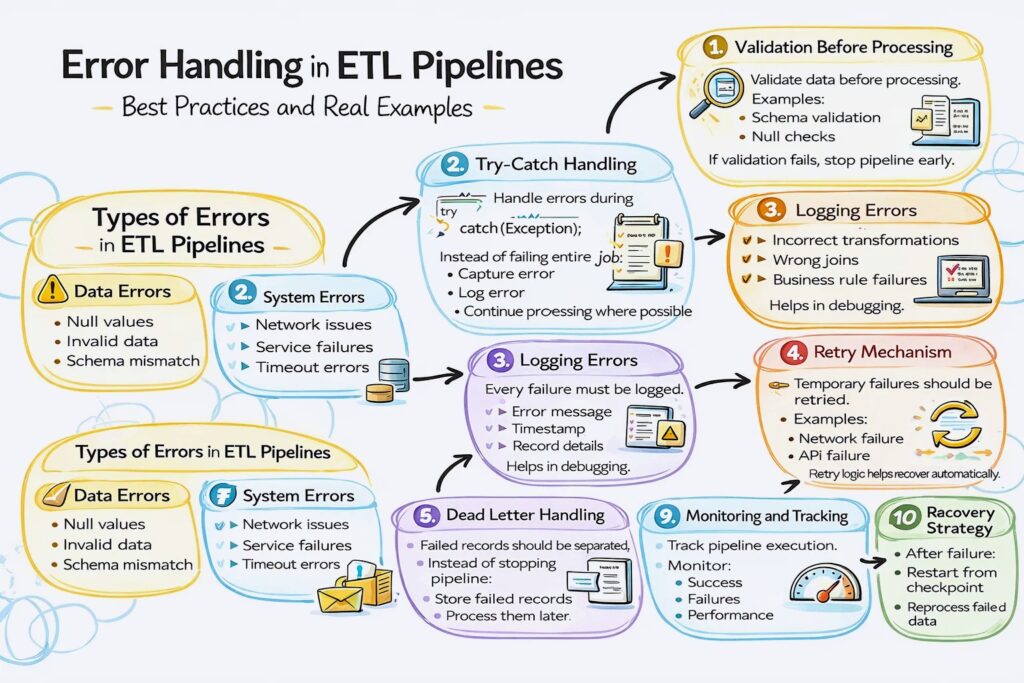
Error Handling in ETL Pipelines – Best Practices and Real Examples
Introduction
Trying to understand error handling in ETL pipelines but not sure what actually needs to be handled?
You’re not alone.
Most people:
- Learn ETL pipelines
- Learn tools like Spark and Glue
- Focus on data processing
But ignore error handling.
And in real projects, pipelines fail frequently due to data issues, system failures, or integration problems.
Because without proper error handling, pipelines break and data becomes unreliable.
In this blog, you’ll understand:
- What error handling is in ETL
- Why it is important
- Types of errors in pipelines
- How to handle errors in real projects
Error handling in ETL pipelines ensures that failures are detected, logged, and managed properly without breaking the entire pipeline.
Why Error Handling is Important
- Prevents pipeline failure
- Ensures data reliability
- Helps in debugging
- Avoids data loss
Without error handling, small issues can stop entire pipelines.
Types of Errors in ETL Pipelines
Data Errors
- Null values
- Invalid data
- Schema mismatch
System Errors
- Network issues
- Service failures
- Timeout errors
Logic Errors
- Incorrect transformations
- Wrong joins
- Business rule failures
Step 1: Validation Before Processing
Validate data before processing.
Examples:
- Schema validation
- Null checks
- Data type checks
If validation fails, stop pipeline early.
Step 2: Try-Catch Handling
Handle errors during processing.
Instead of failing entire job:
- Capture error
- Log error
- Continue processing where possible
Step 3: Logging Errors
Every failure must be logged.
Logs include:
- Error message
- Timestamp
- Record details
Helps in debugging.
Step 4: Retry Mechanism
Temporary failures should be retried.
Examples:
- Network failure
- API failure
Retry logic helps recover automatically.
Step 5: Dead Letter Handling
Failed records should be separated.
Instead of stopping pipeline:
- Store failed records
- Process them later
This is called dead-letter handling.
Step 6: Alerts and Notifications
Notify team when failure happens.
Using:
- Alerts
- Monitoring tools
Ensures quick response.
Step 7: Fail Fast Strategy
If critical error occurs:
- Stop pipeline immediately
Avoids bad data from spreading.
Step 8: Partial Processing
Process valid data even if some records fail.
This ensures:
- Pipeline continues
- Only bad data is isolated
Step 9: Monitoring and Tracking
Track pipeline execution.
Monitor:
- Success
- Failures
- Performance
Step 10: Recovery Strategy
After failure:
- Restart from checkpoint
- Reprocess failed data
Ensures no data loss.
How Error Handling Fits in ETL Pipeline
Typical flow:
- Data ingestion
- Validation checks
- Processing
- Error handling applied
- Clean data stored
- Failed data isolated
Real-World Example
E-commerce pipeline:
- Orders data ingested
- Invalid records detected
- Valid data processed
- Failed records stored separately
- Alerts sent
- Pipeline continues
Common Mistakes
- Not logging errors
- Stopping entire pipeline for small issues
- Ignoring failed records
- No retry mechanism